> ## Documentation Index
> Fetch the complete documentation index at: https://futureagi.mintlify.site/llms.txt
> Use this file to discover all available pages before exploring further.
# Adding Annotations to your Spans
> Learn how to annotate your spans in bulk using the API
Annotations are a way to label your spans with additional information. Annotations are useful for:
* Label your data with custom tags and criteria
* Add custom events to your spans
* Create a golden dataset for your AI training
* Add human feedback to your spans
Annotations are very important for your AI applications, as they allow you to add feedback to trace data.
## How to annotate your spans
Annotations can be added to your spans using the API or UI.
Before adding annotations, you have to create an annotation label which can be only done on the UI.
### 1. Create an annotation label
* Go to your project in Observe/Prototype.
* Click on any Trace or Span to open the Trace Details page.
* Click on the "Annotations" tab.
* Click on the "Create Annotation Label" button.
* Fill in the form with the following information:
* Name: The name of the annotation label.
* Description: The description of the annotation label.
* Type: The type of the annotation label.
* `Text`: this type is used for free text annotations.
* `Numeric`: this type is used for numeric annotations.
* `Categorical`: this type is used for categorical annotations.
* `Star`: this type is used for star rating annotations.
* `Thumbs up/down`: this type is used for thumbs up/down annotations.
* Write the necessary configuration for the annotation label.
* Click on the "Create" button.
* You will be redirected to the Annotation Labels page.
* You can see the created annotation label in the list.
* You can edit the annotation label by clicking on the "Edit" button.
* You can delete the annotation label by clicking on the "Delete" button.
### 2. Add annotations to your spans
On UI after creating an annotation label, you can annotate your spans, by clicking on the "Annotate" button.
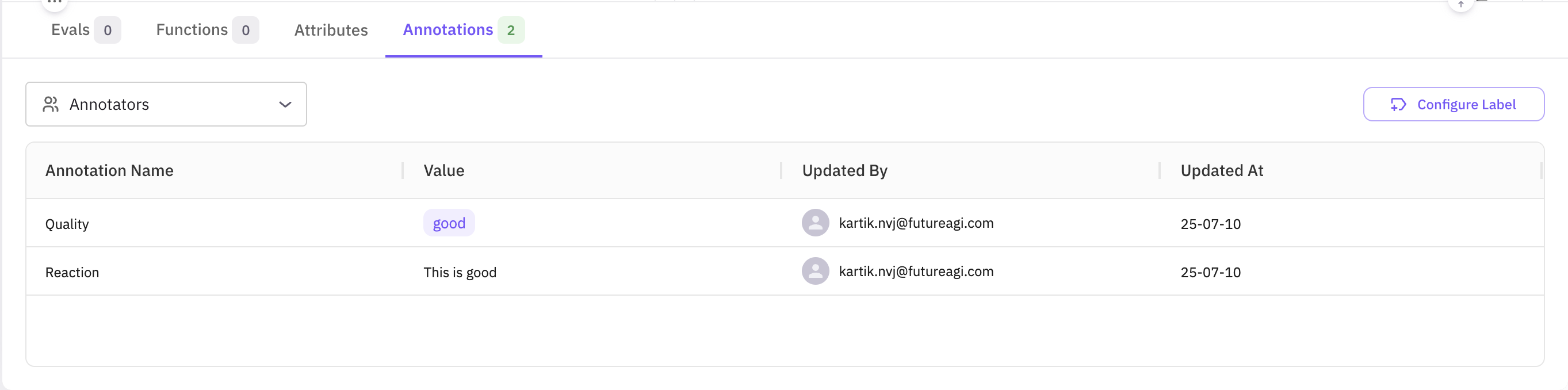 Once you have at least one annotation label, you can add, update, and retrieve annotations with the /tracer/bulk-annotation/ endpoint.
```bash theme={null}
POST https://api.futureagi.com/tracer/bulk-annotation/
```
Authentication should be done using your API key and Secret key.
```bash theme={null}
X-Api-Key:
X-Secret-Key:
```
all request must also include `Content-Type: application/json` header.
### Request payload
`records` is an array; each record targets a single span.
Inside each record you can:
* Add new annotations and notes
* Update existing annotations (matched by annotation\_label\_id + annotator\_id)
* Add notes (duplicates are silently ignored)
Fetching your annotation-label ID
Before you can attach annotations,
you need the internal annotation\_label\_id that corresponds to the label you created in the UI.
You can retrieve it in one line with the /tracer/get-annotation-labels/ endpoint:
```python theme={null}
import requests
BASE_URL = "https://api.futureagi.com"
headers = { # API-key or JWT, as described above
"X-Api-Key": "",
"X-Secret-Key": "",
"Content-Type": "application/json",
}
resp = requests.get(f"{BASE_URL}/tracer/get-annotation-labels/?project_id=", headers=headers, timeout=20) # replace with your project id if you want to get the label for a specific project
resp.raise_for_status()
label_id = resp.json()["result"][0]["id"] # first label in your project, remove the index if you have more than one label
print("Annotation-label ID:", label_id)
```
The response contains a list of all labels in your project;
each item includes id, name, type, and other metadata.
In most scripts you only need one ID, so selecting the first element which was created very recently (result\[0]\["id"]) is a quick way to proceed.
```json theme={null}
{
"records": [
{
"observation_span_id": "", // span to annotate
"annotations": [
{
"annotation_label_id": "lbl_123", // your label id
"annotator_id": "human_annotator_2", // who is annotating
"value": "good" // TEXT label
},
{
"annotation_label_id": "lbl_123",
"annotator_id": "human_annotator_2",
"value_float": 4.2 // NUMERIC label
},
{
"annotation_label_id": "lbl_123",
"annotator_id": "human_annotator_3",
"value_bool": true // THUMBS label
},
{
"annotation_label_id": "lbl_123",
"annotator_id": "human_annotator_4",
"value_str_list": ["option1", "option2"] // CATEGORICAL label
}
],
"notes": [
{
"text": "First note",
"annotator_id": "human_annotator_1"
}
]
},
]
}
```
Supported value keys per label type:
| **Label Type** | **Field to Use** | **Example Value** |
| -------------- | ---------------- | ------------------------ |
| Text | `value` | `"Loved the answer"` |
| Numeric | `value_float` | `4.2` |
| Categorical | `value_str_list` | `["option1", "option2"]` |
| Star rating | `value_float` | `4.0`
Once you have at least one annotation label, you can add, update, and retrieve annotations with the /tracer/bulk-annotation/ endpoint.
```bash theme={null}
POST https://api.futureagi.com/tracer/bulk-annotation/
```
Authentication should be done using your API key and Secret key.
```bash theme={null}
X-Api-Key:
X-Secret-Key:
```
all request must also include `Content-Type: application/json` header.
### Request payload
`records` is an array; each record targets a single span.
Inside each record you can:
* Add new annotations and notes
* Update existing annotations (matched by annotation\_label\_id + annotator\_id)
* Add notes (duplicates are silently ignored)
Fetching your annotation-label ID
Before you can attach annotations,
you need the internal annotation\_label\_id that corresponds to the label you created in the UI.
You can retrieve it in one line with the /tracer/get-annotation-labels/ endpoint:
```python theme={null}
import requests
BASE_URL = "https://api.futureagi.com"
headers = { # API-key or JWT, as described above
"X-Api-Key": "",
"X-Secret-Key": "",
"Content-Type": "application/json",
}
resp = requests.get(f"{BASE_URL}/tracer/get-annotation-labels/?project_id=", headers=headers, timeout=20) # replace with your project id if you want to get the label for a specific project
resp.raise_for_status()
label_id = resp.json()["result"][0]["id"] # first label in your project, remove the index if you have more than one label
print("Annotation-label ID:", label_id)
```
The response contains a list of all labels in your project;
each item includes id, name, type, and other metadata.
In most scripts you only need one ID, so selecting the first element which was created very recently (result\[0]\["id"]) is a quick way to proceed.
```json theme={null}
{
"records": [
{
"observation_span_id": "", // span to annotate
"annotations": [
{
"annotation_label_id": "lbl_123", // your label id
"annotator_id": "human_annotator_2", // who is annotating
"value": "good" // TEXT label
},
{
"annotation_label_id": "lbl_123",
"annotator_id": "human_annotator_2",
"value_float": 4.2 // NUMERIC label
},
{
"annotation_label_id": "lbl_123",
"annotator_id": "human_annotator_3",
"value_bool": true // THUMBS label
},
{
"annotation_label_id": "lbl_123",
"annotator_id": "human_annotator_4",
"value_str_list": ["option1", "option2"] // CATEGORICAL label
}
],
"notes": [
{
"text": "First note",
"annotator_id": "human_annotator_1"
}
]
},
]
}
```
Supported value keys per label type:
| **Label Type** | **Field to Use** | **Example Value** |
| -------------- | ---------------- | ------------------------ |
| Text | `value` | `"Loved the answer"` |
| Numeric | `value_float` | `4.2` |
| Categorical | `value_str_list` | `["option1", "option2"]` |
| Star rating | `value_float` | `4.0`
(1–5) |
| Thumbs up/down | `value_bool` | `true` or `false` |
### Response
#### Response object
Every call returns a top-level boolean status and a nested result object:
| Field | Type | Meaning |
| ------------------------- | ------- | ----------------------------------------------------------------------- |
| status | boolean | true if the request itself was processed (even if some records failed). |
| result.message | string | Human-readable summary. |
| result.annotationsCreated | number | How many annotations were created across all records. |
| result.notesCreated | number | How many notes were created across all records. |
| result.succeededCount | number | Number of records that were applied without errors. |
| result.errorsCount | number | Number of records that had at least one error. |
| result.errors | array | Per-error details (see below). |
#### Error objects
Each element in result.errors contains:
| Field | Type | Example | Description |
| --------------- | ------ | ----------------------------------------------------------- | ---------------------------------------------------------------- |
| recordIndex | number | 1 | Position of the offending record in the records array (0-based). |
| spanId | string | "45635513961540ab" | The span that failed. |
| annotationError | string | "Annotation label "axdf" does not belong to span's project" | Error message for the annotation operation (optional). |
| noteError | string | "Duplicate note" | Error message for the note operation (optional). |
### End to End Example
```python Python theme={null}
#!/usr/bin/env python3
import json, requests
from datetime import datetime
from rich import print as rprint
from rich.console import Console
from rich.table import Table
BASE_URL = "https://api.futureagi.com"
FI_API_KEY = ""
FI_SECRET_KEY = ""
console = Console()
def headers():
return (
{
"X-Api-Key": FI_API_KEY,
"X-Secret-Key": FI_SECRET_KEY,
"Content-Type": "application/json",
}
)
def get_first_label_id():
resp = requests.get(f"{BASE_URL}/tracer/get-annotation-labels/", headers=headers(), timeout=20)
resp.raise_for_status()
label = resp.json()["result"][0]
console.log(f"Using label: {label['name']} ({label['type']})")
return label["id"]
def build_payload(span_id, label_id):
ts = datetime.utcnow().isoformat(timespec="seconds")
return {
"records": [
{
"observation_span_id": span_id,
"annotations": [
{"annotation_label_id": label_id, "annotator_id": "human_a", "value": "good"},
{"annotation_label_id": label_id, "annotator_id": "human_a", "value_float": 4.2},
],
"notes": [{"text": "First note " + ts, "annotator_id": "human_a"}],
}
]
}
def pretty(resp_json):
table = Table(title="Bulk-Annotation Result", show_header=True, header_style="bold cyan")
table.add_column("Key"); table.add_column("Value", overflow="fold")
for k, v in resp_json.items():
table.add_row(k, json.dumps(v, indent=2) if isinstance(v, (dict, list)) else str(v))
console.print(table)
if __name__ == "__main__":
SPAN_ID = ""
payload = build_payload(SPAN_ID, get_first_label_id())
rprint({"payload": payload})
resp = requests.post(f"{BASE_URL}/tracer/bulk-annotation/", headers=headers(), json=payload, timeout=60)
resp.raise_for_status()
pretty(resp.json())
```
```typescript Typescript theme={null}
#!/usr/bin/env ts-node
import axios from "axios";
const BASE_URL = "https://api.futureagi.com";
const SPAN_ID = "";
// Choose ONE auth method
const FI_API_KEY = "";
const FI_SECRET_KEY = "";
// ────────────────────────────
function headers(): Record {
return {
"X-Api-Key": FI_API_KEY,
"X-Secret-Key": FI_SECRET_KEY,
"Content-Type": "application/json",
};
}
async function getFirstLabelId(): Promise {
const resp = await axios.get(`${BASE_URL}/tracer/get-annotation-labels/`, {
headers: headers(),
timeout: 20000,
});
const label = resp.data.result[0];
console.log(`Using label: ${label.name} (${label.type})`);
return label.id;
}
function buildPayload(spanId: string, labelId: string) {
const ts = new Date().toISOString().slice(0, 19);
const recordNew = {
observation_span_id: spanId,
annotations: [
{ annotation_label_id: labelId, annotator_id: "human_annotator_1", value: "good" },
],
notes: [
{ text: "First note " + ts, annotator_id: "human_annotator_1" },
],
};
return { records: [recordNew] };
}
async function main() {
try {
const labelId = await getFirstLabelId();
const payload = buildPayload(SPAN_ID, labelId);
console.log("\n──── REQUEST PAYLOAD ────");
console.dir(payload, { depth: null });
const resp = await axios.post(`${BASE_URL}/tracer/bulk-annotation/`, payload, {
headers: headers(),
timeout: 60000,
});
console.log("\n──── RESPONSE ────");
console.dir(resp.data, { depth: null });
} catch (err: any) {
if (err.response) {
console.error(`HTTP ${err.response.status}`);
console.error(err.response.data);
} else {
console.error("Error:", err.message);
}
process.exit(1);
}
}
main();
```
```bash Curl theme={null}
curl -X POST https://api.futureagi.com/tracer/bulk-annotation/ \
-H "X-Api-Key: " \
-H "X-Secret-Key: " \
-H "Content-Type: application/json" \
-d '{"records": [{"observation_span_id": "", "annotations": [{"annotation_label_id": "", "annotator_id": "human_annotator_1", "value": "good"}]}]}'
```
### Best practices
* Immutable labels – avoid changing the meaning of an existing label; create a new one instead.
* Consistent annotator IDs – use stable identifiers ("human\_annotator\_1", "model\_v1", …).
* Batch updates – updating many spans? Group 100–500 records per request to minimize network overhead.
* Idempotency – sending the same note text twice in a record skips duplicates, keeping data clean.
* Monitor quotas – large annotation operations count toward your project’s API usage.
That’s it! You now have a complete workflow for labeling, adding, and updating annotations programmatically.