> ## Documentation Index
> Fetch the complete documentation index at: https://futureagi.mintlify.site/llms.txt
> Use this file to discover all available pages before exploring further.
# Sessions
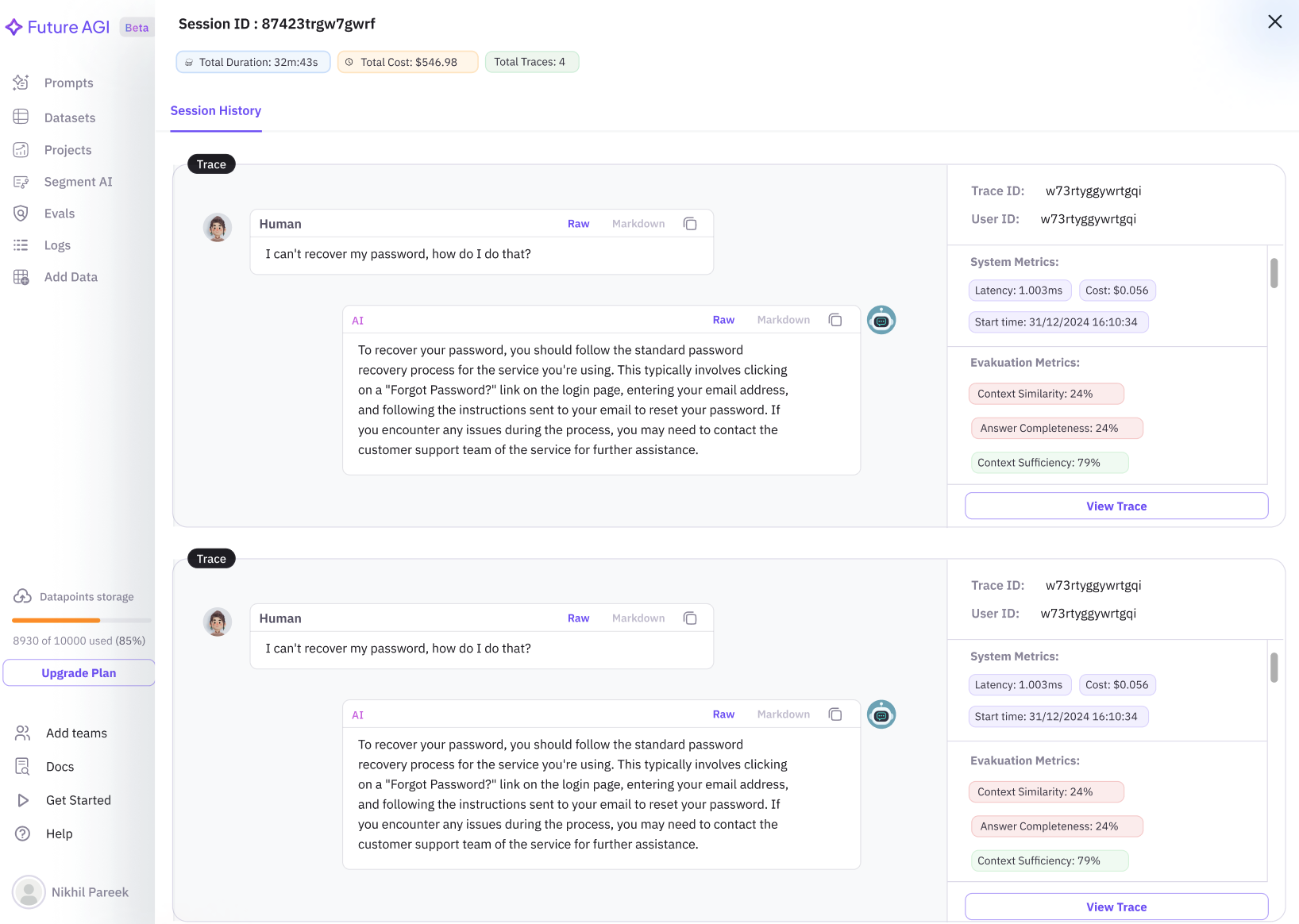
> Sessions in Future AGI are used to group traces, such as those from chatbot conversations. This feature allows users to view and analyze interactions between a human and AI, making it easier to build or debug chatbot applications.
On the Sessions page, users can view a list of sessions created within a project. Each session is identified by a unique Session ID and groups traces based on this attribute.
### Key Features
* **Timeframe Filtering**: Easily filter sessions by specific time periods to access relevant data quickly.
* **Session Overview**: View a comprehensive list of sessions, providing a snapshot of key information such as session duration and user interactions.
* **Detailed Session Insights**: Click on a session to access in-depth details, including conversation history and trace specifics.
* **Trace Analysis**: Click on `View Trace` to dive deeper into individual traces for thorough analysis.
* **Performance Metrics**: Monitor system performance with metrics like latency and cost, and evaluate interaction quality through [evaluation](/future-agi/products/observe/evals) metrics.
 ## How to Add Sessions
To associate interactions with a specific session, you can use the following methods:
### 1. Include `session.id` in a Span
When creating a span, include the `session.id` attribute to link interactions to a specific session:
```python Python theme={null}
from fi_instrumentation import register, FITracer
trace_provider = register(
project_type=ProjectType.OBSERVE,
project_name="PROJECT_NAME",
)
tracer = FITracer(trace_provider.get_tracer(__name__))
with tracer.start_as_current_span(
f"SPAN_NAME",
) as span:
span.set_status(Status(StatusCode.OK))
span.set_attribute("session.id", "session123")
span.set_attribute("input.value", "input")
span.set_attribute("output.value", "output")
```
```javascript JS/TS theme={null}
const { register, ProjectType } = require("@traceai/fi-core");
const traceProvider = register({
project_type: ProjectType.OBSERVE,
project_name: "FUTURE_AGI"
});
const tracer = traceProvider.getTracer("manual-instrumentation-example");
tracer.startActiveSpan("HandleFunctionCall", {}, (span) => {
// Set the session.id attribute
span.setAttribute("session.id", "my-session-id");
// End the span
span.end();
});
```
### 2. Use `using_session` Context Manager
You can use the `using_session` context manager to set `session.id` for all spans within the context. This method ensures that the session ID is consistently passed as a span attribute:
```python Python theme={null}
from fi_instrumentation import using_session
with using_session(session_id="my-session-id"):
# Calls within this block will generate spans with the attributes:
# "session.id" = "my-session-id"
...
```
```javascript JS/TS theme={null}
import { context, propagation } from "@opentelemetry/api";
const sessionId = "my-js-session-id"; // Example session ID
const activeContext = context.active();
const baggageWithSession = propagation.createBaggage({
"session.id": { value: sessionId }
});
const newContext = propagation.setBaggage(activeContext, baggageWithSession);
context.with(newContext, () => {
// Calls within this block by auto-instrumented libraries (like traceAI)
// should generate spans with the attribute: "session.id" = "my-js-session-id"
// e.g., myInstrumentedFunction();
});
```
For more information on how to set `session.id` using Trace AI helper functions, refer to the [manual tracing guide](/future-agi/get-started/observability/manual-tracing/set-session-user-id).
## Usage
Sessions are particularly useful for:
* Debugging chatbot interactions by reviewing grouped traces.
* Analyzing conversation flow and identifying areas for improvement.
* Monitoring system performance and cost efficiency.
For more detailed trace analysis, users can click the `View Trace` button to access specific trace information.
## How to Add Sessions
To associate interactions with a specific session, you can use the following methods:
### 1. Include `session.id` in a Span
When creating a span, include the `session.id` attribute to link interactions to a specific session:
```python Python theme={null}
from fi_instrumentation import register, FITracer
trace_provider = register(
project_type=ProjectType.OBSERVE,
project_name="PROJECT_NAME",
)
tracer = FITracer(trace_provider.get_tracer(__name__))
with tracer.start_as_current_span(
f"SPAN_NAME",
) as span:
span.set_status(Status(StatusCode.OK))
span.set_attribute("session.id", "session123")
span.set_attribute("input.value", "input")
span.set_attribute("output.value", "output")
```
```javascript JS/TS theme={null}
const { register, ProjectType } = require("@traceai/fi-core");
const traceProvider = register({
project_type: ProjectType.OBSERVE,
project_name: "FUTURE_AGI"
});
const tracer = traceProvider.getTracer("manual-instrumentation-example");
tracer.startActiveSpan("HandleFunctionCall", {}, (span) => {
// Set the session.id attribute
span.setAttribute("session.id", "my-session-id");
// End the span
span.end();
});
```
### 2. Use `using_session` Context Manager
You can use the `using_session` context manager to set `session.id` for all spans within the context. This method ensures that the session ID is consistently passed as a span attribute:
```python Python theme={null}
from fi_instrumentation import using_session
with using_session(session_id="my-session-id"):
# Calls within this block will generate spans with the attributes:
# "session.id" = "my-session-id"
...
```
```javascript JS/TS theme={null}
import { context, propagation } from "@opentelemetry/api";
const sessionId = "my-js-session-id"; // Example session ID
const activeContext = context.active();
const baggageWithSession = propagation.createBaggage({
"session.id": { value: sessionId }
});
const newContext = propagation.setBaggage(activeContext, baggageWithSession);
context.with(newContext, () => {
// Calls within this block by auto-instrumented libraries (like traceAI)
// should generate spans with the attribute: "session.id" = "my-js-session-id"
// e.g., myInstrumentedFunction();
});
```
For more information on how to set `session.id` using Trace AI helper functions, refer to the [manual tracing guide](/future-agi/get-started/observability/manual-tracing/set-session-user-id).
## Usage
Sessions are particularly useful for:
* Debugging chatbot interactions by reviewing grouped traces.
* Analyzing conversation flow and identifying areas for improvement.
* Monitoring system performance and cost efficiency.
For more detailed trace analysis, users can click the `View Trace` button to access specific trace information.