> ## Documentation Index
> Fetch the complete documentation index at: https://futureagi.mintlify.site/llms.txt
> Use this file to discover all available pages before exploring further.
# Fix My Agent
> Get AI-powered diagnostics and instant fixes for your agent's performance issues
After running simulations, Future AGI's **Fix My Agent** feature automatically analyzes your agent's performance and provides actionable recommendations to improve quality, reduce failures, and enhance overall effectiveness. Instead of manually debugging issues, get intelligent suggestions with one click.
***
## Overview
**Fix My Agent** is your AI-powered diagnostic tool that turns simulation data into actionable insights. After each simulation run, the platform:
* **Analyzes** simulation performance metrics and call patterns
* **Identifies** specific issues and failure modes
* **Prioritizes** recommendations by impact and urgency
* **Suggests** targeted fixes you can implement immediately
* **Generates** optimized system prompts automatically (optional)
Think of it as having an AI expert reviewing your agent's conversations and telling you exactly what needs to be fixed—no manual debugging required.
**Fix My Agent** provides instant diagnostics and suggestions. For teams needing advanced prompt refinement, the platform also offers **optimization algorithms** (described later in this guide) that can automatically generate and test multiple prompt variations.
### Quick Start: Recommended Workflow
1. ⚡ **Run simulation** → Click **"Fix My Agent"** → Get instant suggestions
2. ✏️ **Implement fixes manually** → Update your system prompt based on recommendations
3. ✅ **Validate** → Re-run simulation to confirm improvements
4. 🔄 **Iterate** → Repeat until your agent meets quality goals
**95% of teams get great results with just steps 1-3.** Auto-optimization is available if you need to test many prompt variations or want production-grade automated refinement.
***
## Using Fix My Agent
After running a simulation, you can access **Fix My Agent** directly from the execution results page to get instant diagnostics and recommendations.
### Step 1: Navigate to Simulation Results
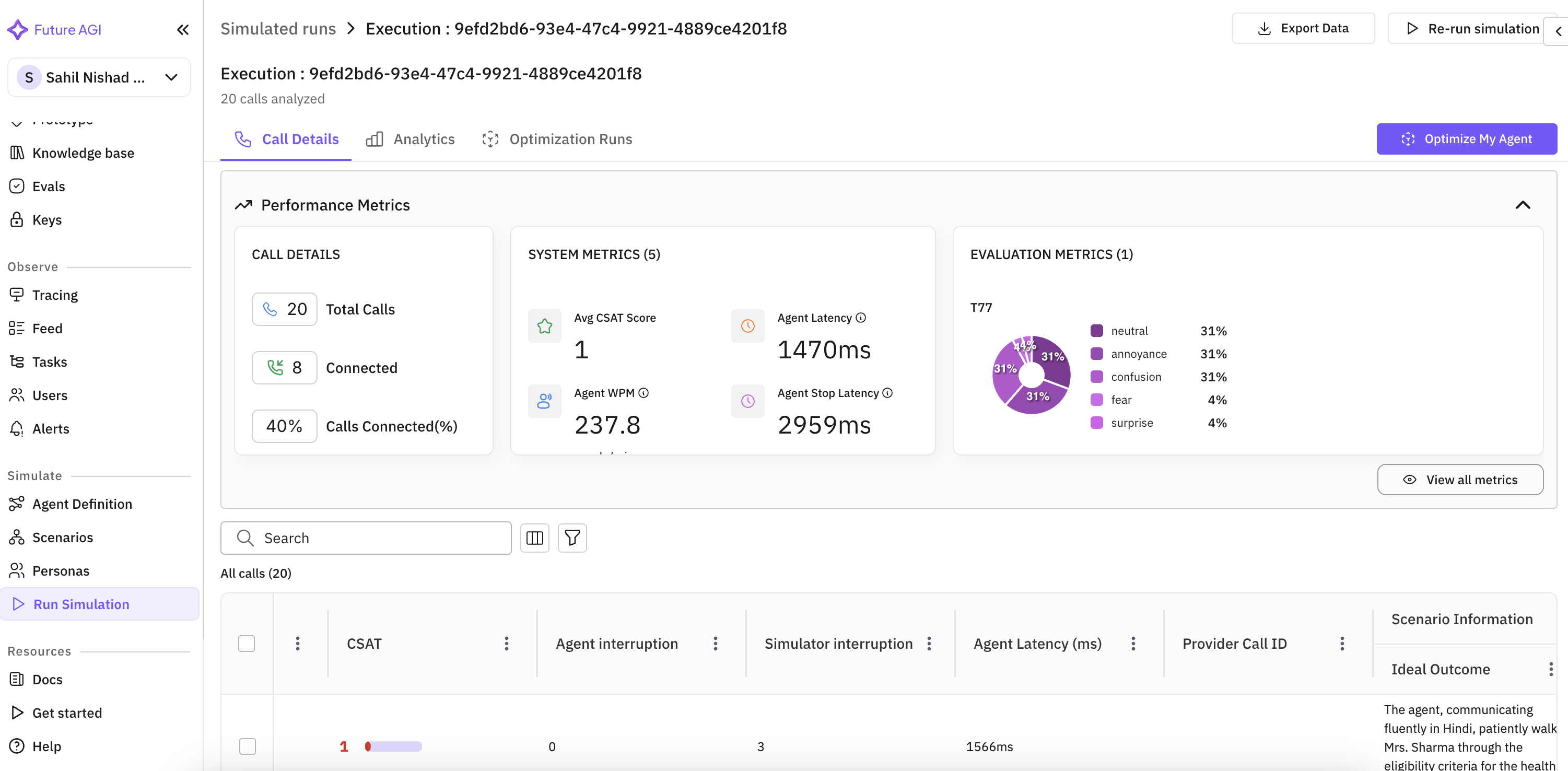
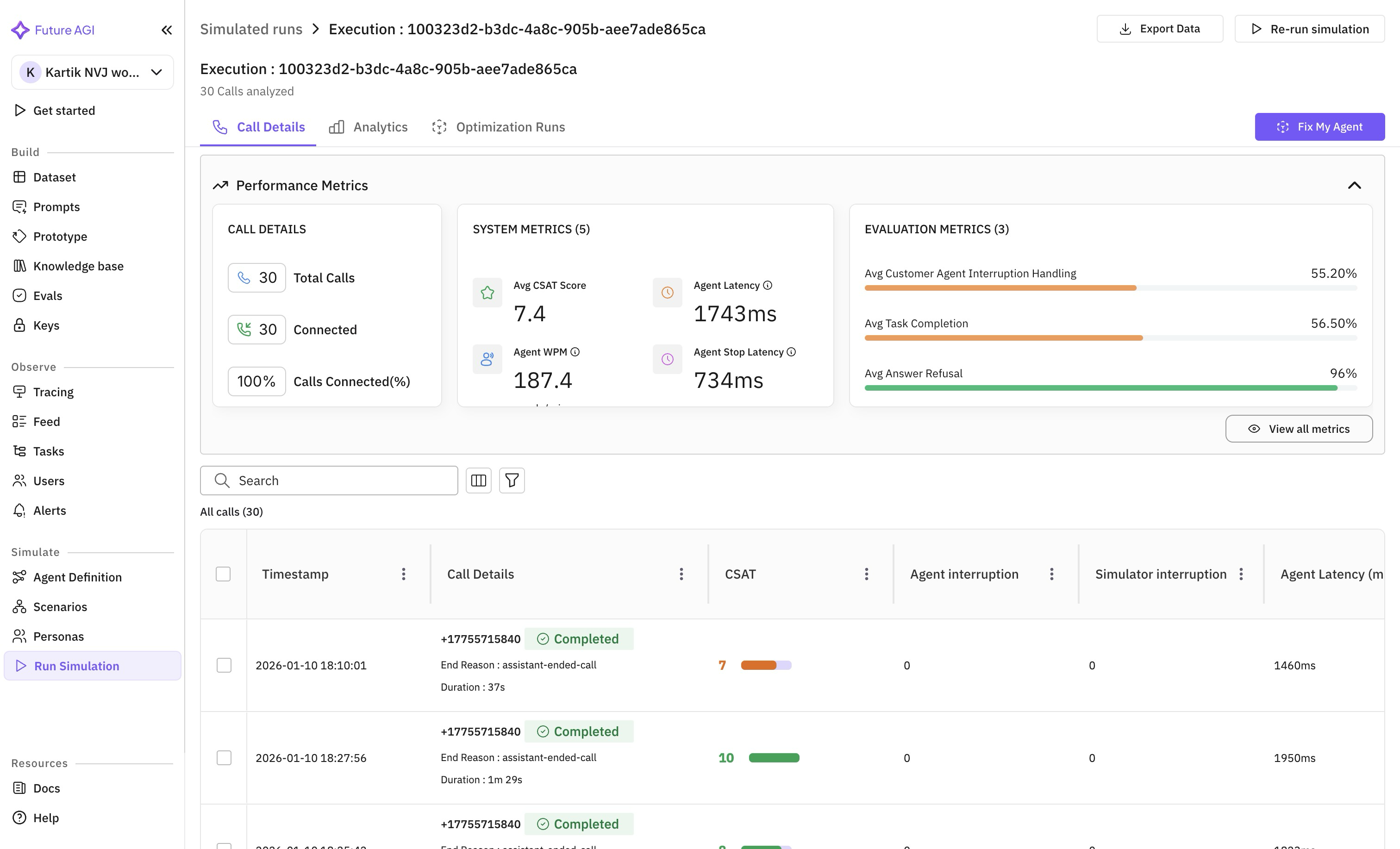
Once your simulation run completes, you'll see the execution details page with performance metrics including:
* **Call Details**: Total calls, connected calls, connection rate
* **System Metrics**: CSAT scores, agent latency, WPM (Words Per Minute)
* **Evaluation Metrics**: Custom evaluation results
### Step 2: Open Fix My Agent Panel
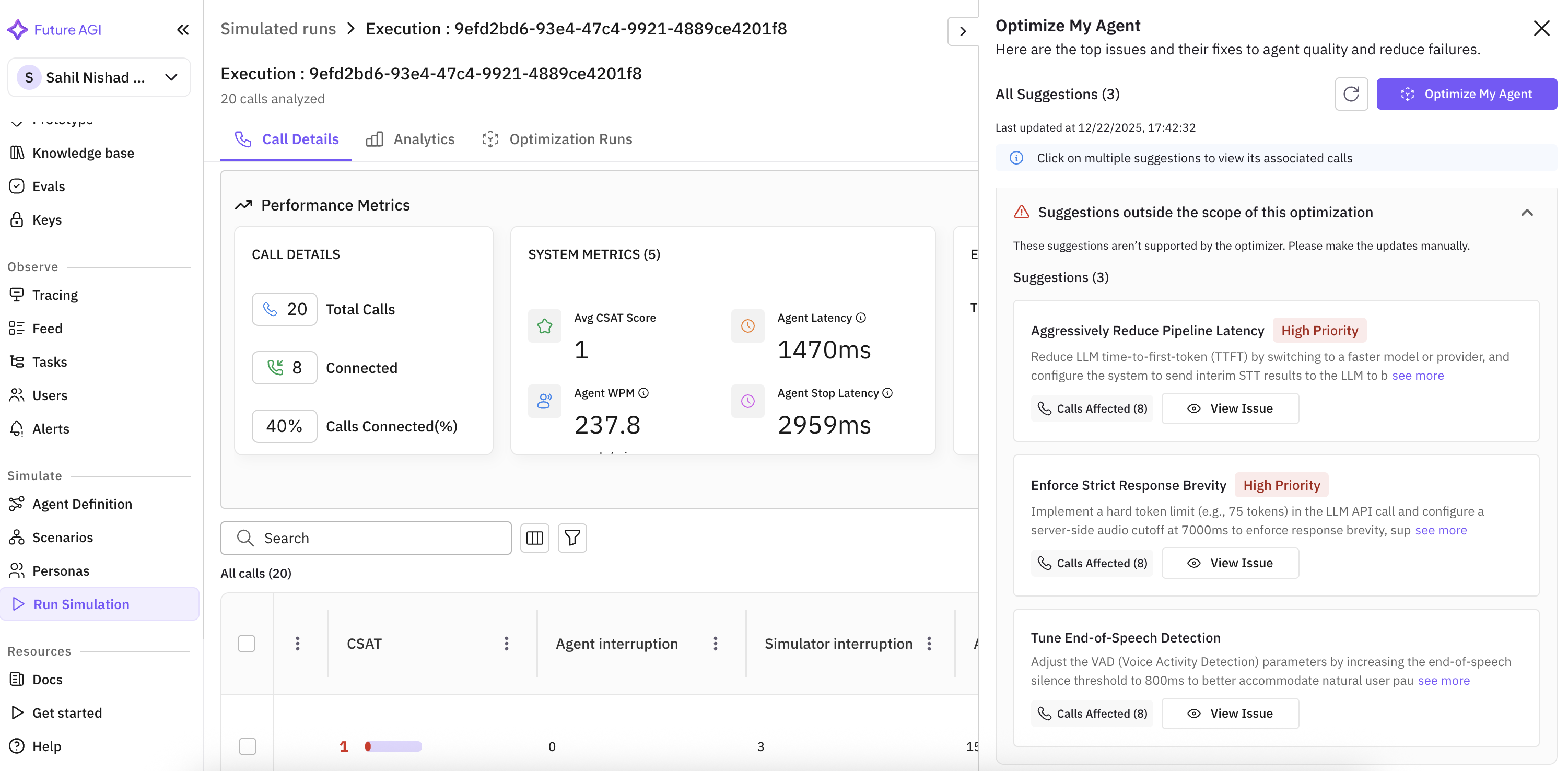
Click the **"Fix My Agent"** button in the top-right corner of the execution page. This opens a side panel showing:
* **All Suggestions**: Total number of issues identified
* **Priority Levels**: High, Medium, or Low priority for each issue
* **Issue Categories**: Specific problems identified (latency, response brevity, detection tuning)
* **Affected Calls**: Number of calls impacted by each issue
* **Last Updated**: Timestamp of the latest analysis
**Fix My Agent** automatically analyzes your simulation results and generates suggestions by identifying patterns, edge cases, and failure modes. No configuration required—just click and get actionable recommendations.
### Understanding Suggestions
Each suggestion provides:
1. **Issue Description**: Clear explanation of the identified problem
2. **Recommended Fix**: Specific action to address the issue
3. **Priority Level**: Urgency of the fix (High/Medium/Low)
4. **Affected Calls**: Which calls exhibited this issue
5. **View Issue Button**: Deep-dive into specific call examples
**Example Suggestions:**
* **Aggressively Reduce Pipeline Latency** - Reduce LLM time-to-first-token (TTFT) by switching to a faster model
* **Enforce Strict Response Brevity** - Implement a hard token limit to enforce concise responses
* **Tune End-of-Speech Detection** - Adjust VAD parameters for better conversation flow
Start with High Priority suggestions that affect the most calls. These typically have the greatest impact on overall agent performance.
***
## Advanced: Auto-Generate Optimized Prompts
After reviewing **Fix My Agent** suggestions, you have two options:
1. **Implement suggestions manually** - Take the recommendations and update your prompts yourself (recommended for most users)
2. **Auto-generate optimized prompts** - Use advanced optimization algorithms to automatically create and test multiple prompt variations
For teams that want automated prompt refinement, the platform includes powerful optimization algorithms that can systematically improve your agent's system prompt.
### Step 3: Configure Auto-Optimization (Optional)
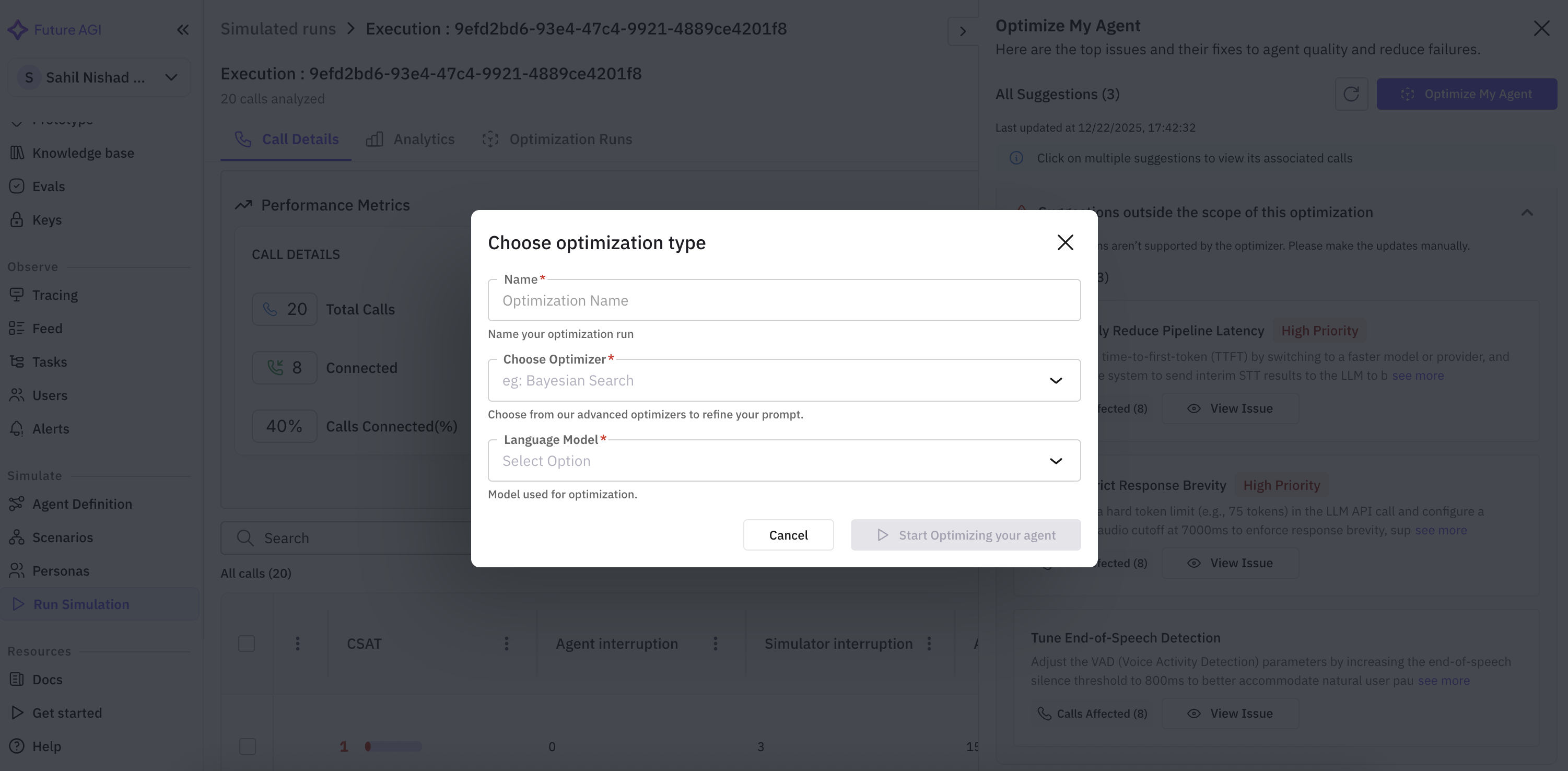
If you want to automatically generate optimized system prompts, click the **"Optimize My Agent"** button in the Fix My Agent panel to open the optimization configuration dialog.
#### Required Configuration:
**1. Name Your Optimization Run**
* Enter a descriptive name (e.g., "opt1", "latency-optimization-v2")
* This helps track multiple optimization experiments
**2. Choose Optimizer**
Select from Future AGI's advanced optimization algorithms:
**Best for**: Quick baseline testing and initial exploration
**How it works**: Generates random prompt variations using a teacher model and evaluates each candidate.
**Characteristics**:
* ⚡⚡⚡ Fast execution
* ⭐⭐ Basic quality improvements
* 💰 Low cost
* Ideal for: 10-30 examples
**Use when**: You need quick results or want to establish a performance baseline before trying more sophisticated algorithms.
**Best for**: Few-shot learning tasks and intelligent example selection
**How it works**: Uses Bayesian optimization to intelligently select few-shot examples and prompt configurations.
**Characteristics**:
* ⚡⚡ Medium speed
* ⭐⭐⭐⭐ High quality
* 💰💰 Medium cost
* Ideal for: 15-50 examples
**Use when**: Your dataset contains good examples and you want to leverage few-shot learning effectively.
**Best for**: Complex reasoning tasks requiring deep analysis
**How it works**: Analyzes failed examples, formulates hypotheses, and rewrites the entire prompt through deep reasoning.
**Characteristics**:
* ⚡⚡ Medium speed
* ⭐⭐⭐⭐ High quality
* 💰💰💰 Higher cost
* Ideal for: 20-40 examples
**Use when**: Your agent handles complex reasoning tasks or you need holistic prompt redesign.
**Best for**: Identifying and fixing specific error patterns
**How it works**: Generates critiques of failures and applies targeted improvements using beam search to maintain multiple candidates.
**Characteristics**:
* ⚡ Slower execution
* ⭐⭐⭐⭐ High quality
* 💰💰💰 Higher cost
* Ideal for: 20-50 examples
**Use when**: You have clear failure patterns and want systematic error fixing.
**Best for**: Creative exploration and diverse prompt variations
**How it works**: Combines mutation with different "thinking styles", then critiques and refines top performers.
**Characteristics**:
* ⚡ Slower execution
* ⭐⭐⭐⭐ High quality
* 💰💰💰 Higher cost
* Ideal for: 15-40 examples
**Use when**: You want creative exploration or diverse conversational approaches.
**Best for**: Production deployments requiring state-of-the-art performance
**How it works**: Uses evolutionary algorithms with reflective learning and mutation strategies inspired by natural selection.
**Characteristics**:
* ⚡ Slower execution
* ⭐⭐⭐⭐⭐ Excellent quality
* 💰💰💰💰 Highest cost
* Ideal for: 30-100 examples
**Use when**: You need production-grade optimization with robust results and have sufficient evaluation budget.
**3. Select Language Model**
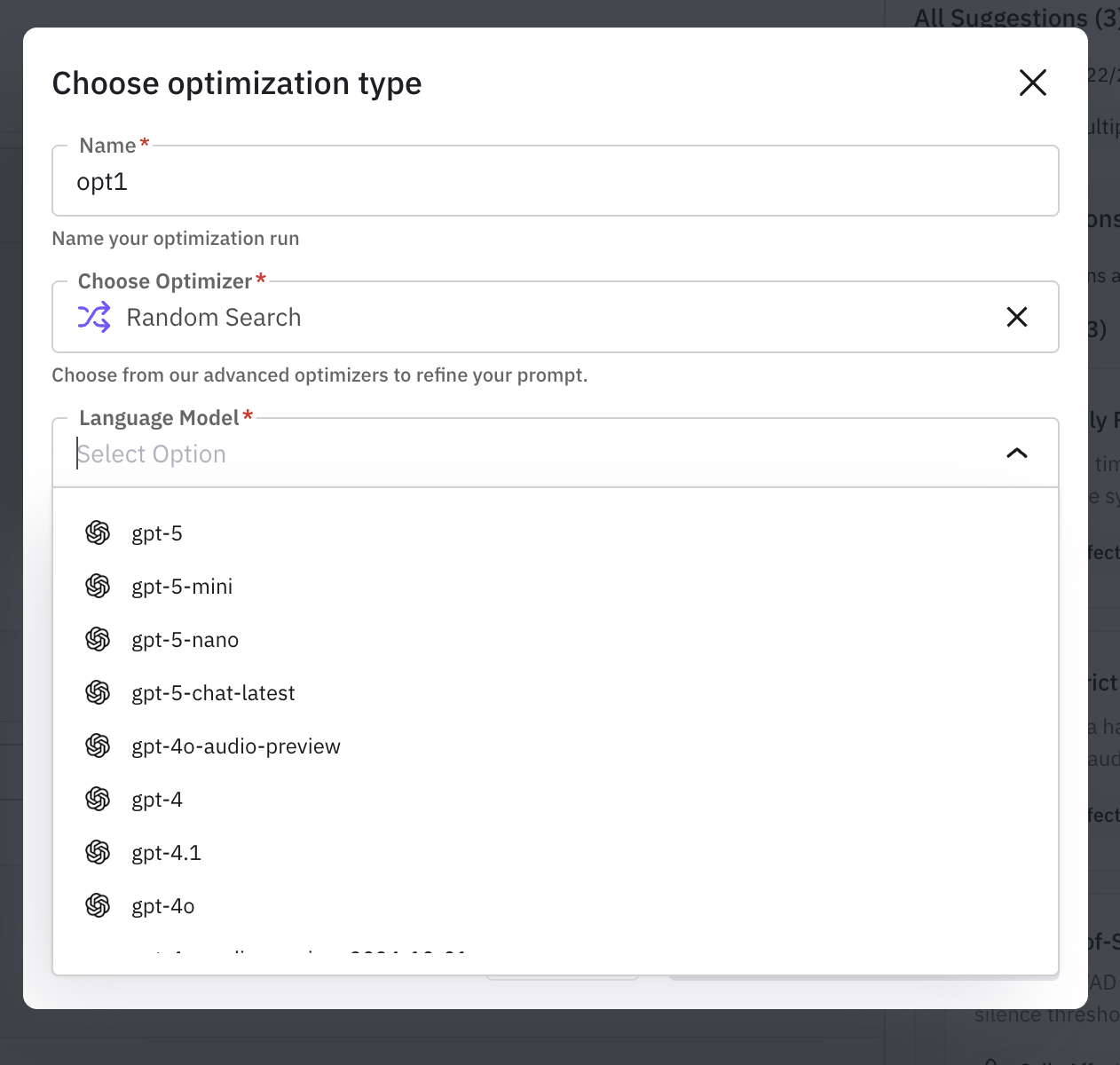
Choose the model that will be used for the optimization process:
Available models include:
* **gpt-5** series (gpt-5, gpt-5-mini, gpt-5-nano, gpt-5-chat-latest)
* **gpt-4** series (gpt-4, gpt-4.1, gpt-4o, gpt-4o-audio-preview)
* Other supported models from your configuration
For optimization, using a more powerful model (like gpt-4 or gpt-5) as the teacher model often yields better prompt improvements, even if your production agent uses a smaller model.
**4. Add Parameters**
Configure optimizer-specific parameters:
* **Number Variations**: How many prompt variations to generate and test
* Start with 3-5 for quick iterations
* Use 10-20 for thorough optimization
* Consider cost vs. quality tradeoff
Each optimizer may have additional parameters. The platform shows recommended defaults that balance speed and quality.
### Step 4: Start Auto-Optimization
Click **"Start Optimizing your agent"** to begin the automated prompt generation process.
The optimization engine will:
1. **Analyze** your simulation data and Fix My Agent suggestions
2. **Generate** multiple system prompt variations using the selected algorithm
3. **Evaluate** each variation against your test scenarios
4. **Score** performance improvements
5. **Select** the best-performing optimized prompt
Most users find that manually implementing **Fix My Agent** suggestions is the fastest path to improvement. Use auto-optimization when you need to test many prompt variations or want production-grade automated refinement.
***
## Advanced: Auto-Optimization Algorithms
For teams that choose to use automated prompt generation, Future AGI provides advanced optimization algorithms. This section explains how each algorithm works to help you choose the right strategy.
Most teams get excellent results by implementing **Fix My Agent** suggestions manually. These algorithms are for advanced use cases where you need to test many prompt variations automatically.
### Quick Selection Guide
| Your Goal | Recommended Algorithm | Why |
| ----------------------------- | ---------------------- | --------------------------------------------- |
| Quick improvement baseline | Random Search | Fast, simple, establishes performance floor |
| Reduce latency issues | Bayesian Search | Efficiently explores configuration space |
| Fix conversation logic errors | ProTeGi or Meta-Prompt | Targets specific failure patterns |
| Improve complex reasoning | Meta-Prompt | Deep analysis and systematic refinement |
| Optimize for production | GEPA | State-of-the-art evolutionary optimization |
| Explore creative approaches | PromptWizard | Diverse variations with structured refinement |
### Algorithm Comparison
| Algorithm | Speed | Quality | Cost | Best Dataset Size |
| ------------------- | ----- | ------- | -------- | ----------------- |
| **Random Search** | ⚡⚡⚡ | ⭐⭐ | 💰 | 10-30 examples |
| **Bayesian Search** | ⚡⚡ | ⭐⭐⭐⭐ | 💰💰 | 15-50 examples |
| **Meta-Prompt** | ⚡⚡ | ⭐⭐⭐⭐ | 💰💰💰 | 20-40 examples |
| **ProTeGi** | ⚡ | ⭐⭐⭐⭐ | 💰💰💰 | 20-50 examples |
| **PromptWizard** | ⚡ | ⭐⭐⭐⭐ | 💰💰💰 | 15-40 examples |
| **GEPA** | ⚡ | ⭐⭐⭐⭐⭐ | 💰💰💰💰 | 30-100 examples |
* Speed: ⚡ = Slow, ⚡⚡ = Medium, ⚡⚡⚡ = Fast
* Quality: ⭐ = Basic, ⭐⭐⭐⭐⭐ = Excellent
* Cost: 💰 = Low, 💰💰💰💰 = High (based on API calls)
### Decision Tree
```
Do you need production-grade optimization?
├─ Yes → Use GEPA
└─ No
│
Do you have clear error patterns to fix?
├─ Yes → Use ProTeGi
└─ No
│
Is your task reasoning-heavy or complex?
├─ Yes → Use Meta-Prompt
└─ No
│
Do you need few-shot learning optimization?
├─ Yes → Use Bayesian Search
└─ No
│
Do you want creative exploration?
├─ Yes → Use PromptWizard
└─ No → Use Random Search (baseline)
```
***
## Viewing and Deploying Improvements
### For Manual Implementations
After implementing **Fix My Agent** suggestions:
1. **Re-run simulations** with your updated prompt
2. **Compare metrics** to baseline in the execution dashboard
3. **Review new suggestions** from Fix My Agent
4. **Iterate** until performance meets your goals
5. **Deploy** to production when satisfied
### For Auto-Optimization Results
If you used automated optimization, view results in the **Optimization Runs** tab:
1. **Performance Comparison**
* Original prompt baseline scores
* Auto-generated prompt scores
* Improvement percentage
2. **Best Prompt**
* The highest-performing variation
* Changes made from the original
* Evaluation scores across metrics
3. **Optimization History**
* All variations tested
* Performance trajectory
* Iteration details
### Deployment Checklist
Whether implementing manually or using auto-optimization:
✓ **Review** the improved prompt carefully\
✓ **Test** with additional scenarios not in original dataset\
✓ **Update** your agent definition with the new prompt\
✓ **Re-run** simulations to validate improvements\
✓ **Monitor** performance in production
Always validate with new test cases before production deployment. Both manual and automated approaches can overfit to the evaluation dataset.
***
## Best Practices
### 1. Start with Fix My Agent Suggestions
**Always begin with manual implementation**:
* Review all **Fix My Agent** suggestions after each simulation
* Implement high-priority fixes first (greatest impact)
* Re-run simulation to validate improvements
* Only use auto-optimization if you need to test many variations
**Fix My Agent** provides instant, actionable recommendations that you can implement in minutes. Most teams see significant improvements by simply following the suggestions without needing automated optimization.
### 2. Use Sufficient Test Data
**Fix My Agent** works best with comprehensive simulation data:
* Run at least **20-50 simulation scenarios** before analyzing
* Ensure scenarios cover diverse situations and edge cases
* Include examples of both successful and failed interactions
* More data = more accurate diagnostics
### 3. Implement Iteratively
Don't try to fix everything at once:
* Address 1-2 high-priority issues per iteration
* Re-run simulations after each change
* Verify improvements before moving to next issue
* Track what worked and what didn't
### 4. Use Auto-Optimization Strategically
If you choose to use automated optimization algorithms:
* **Latency issues**: Bayesian Search (efficient parameter tuning)
* **Conversation logic errors**: ProTeGi (targeted error fixing)
* **Complex reasoning**: Meta-Prompt (deep analysis)
* **Production deployment**: GEPA (robust evolutionary search)
### 5. Balance Cost and Quality
For auto-optimization (API calls required):
* Start with fewer variations (3-5) for quick iterations
* Increase variations (10-20) when you're close to deployment
* Use faster algorithms (Random Search, Bayesian Search) for experimentation
* Reserve expensive algorithms (GEPA, Meta-Prompt) for critical optimizations
### 6. Always Validate Improvements
Whether implementing manually or using auto-optimization:
* Run new simulations after making changes
* Compare metrics against the baseline
* Test on scenarios not included in the original dataset
* Monitor for unexpected behaviors or regressions
***
## Complete Workflow Example
Here's how to improve an insurance sales agent using **Fix My Agent**:
### Initial State
* Agent has 40% call connection rate
* High latency (1470ms response time)
* Mixed sentiment scores
### Step 1: Run Comprehensive Simulations
```
- Create 50 diverse scenarios covering:
✓ Different customer types
✓ Various objection patterns
✓ Edge cases and difficult situations
- Run simulation and analyze results
```
### Step 2: Open Fix My Agent
```
Click "Fix My Agent" button to get instant diagnostics
Suggestions identified:
- [High Priority] Reduce Pipeline Latency (8 calls affected)
→ Switch to faster model or reduce system prompt verbosity
- [High Priority] Enforce Response Brevity (8 calls affected)
→ Add explicit instruction: "Keep responses under 50 words"
- [Medium Priority] Tune End-of-Speech Detection (8 calls affected)
→ Adjust endpointing delay parameters
```
### Step 3: Implement High-Priority Fixes
```
Manual changes made to system prompt:
✓ Added: "Be extremely concise. Maximum 2 sentences per response."
✓ Switched model: gpt-4o → gpt-4o-mini (faster)
✓ Removed: Verbose examples from system prompt
```
### Step 4: Validate Improvements
```
- Run new simulation with updated prompt
- Compare results:
Before: 40% connection rate, 1470ms latency
After: 65% connection rate, 850ms latency
Improvement: +62.5% connection rate, -42% latency
```
### Optional Step 5: Auto-Optimization (If Needed)
```
If manual fixes aren't sufficient, use auto-optimization:
- Name: "insurance-agent-production-v1"
- Optimizer: GEPA
- Model: gpt-4o
- Variations: 15
- Result: Additional 5% improvement in conversion rate
```
In this example, **Fix My Agent** provided instant, actionable suggestions that the team implemented in 10 minutes, resulting in 62.5% improvement. Auto-optimization was used as a final refinement step for production deployment.
***
## Troubleshooting
### No Suggestions in Fix My Agent
**Possible causes**:
* Not enough simulation data (need 20+ calls)
* Agent performed perfectly (no issues detected)
* Evaluation metrics not configured
**Solutions**:
* Run more comprehensive simulations
* Add diverse scenarios including edge cases
* Configure custom evaluation metrics to measure quality
### Manual Fixes Not Improving Performance
**Possible causes**:
* Suggestions not fully implemented
* Changes introduced new issues
* Need more comprehensive refinement
**Solutions**:
* Double-check all high-priority suggestions are addressed
* Test changes incrementally (one at a time)
* Consider using auto-optimization for systematic refinement
### Auto-Optimization Not Improving Performance
**Possible causes**:
* Insufficient training data
* Wrong optimizer for the problem type
* Too few variations tested
* Overfitting to evaluation set
**Solutions**:
* Ensure you have 30+ diverse simulation scenarios
* Try a different optimization algorithm (see selection guide)
* Increase number of variations (10-20)
* Validate on held-out test scenarios
### Auto-Optimization Taking Too Long
**Possible causes**:
* Using slow optimizer (GEPA, ProTeGi)
* Too many variations configured
* Large dataset size
**Solutions**:
* Consider implementing **Fix My Agent** suggestions manually instead
* Start with Random Search or Bayesian Search for faster results
* Reduce number of variations to 3-5
* Use a smaller sample of representative scenarios
***
## Advanced Topics
### Combining Fix My Agent with Auto-Optimization
Get the best of both worlds:
1. **Use Fix My Agent** to get instant diagnostic suggestions
2. **Implement high-priority fixes manually** for quick wins
3. **Run auto-optimization** for additional systematic refinement
4. **Compare results** between manual and automated approaches
5. **Deploy the best-performing version**
This hybrid approach is ideal for production deployments: get 80% improvement from manual fixes in minutes, then use auto-optimization to squeeze out the remaining 20%.
### Custom Evaluation Metrics
**Fix My Agent** and optimization work better with custom evaluation metrics that match your business goals:
* **Conversion Rate**: Did the agent successfully convert the customer?
* **Compliance**: Did the agent follow regulatory requirements?
* **Customer Satisfaction**: Sentiment and CSAT scores
* **Efficiency**: Response latency, call duration, token usage
Both **Fix My Agent** diagnostics and optimization algorithms use your evaluation metrics to identify issues and measure improvements. Better metrics lead to better suggestions.
### Fix My Agent for Different Agent Types
Different agent types see different patterns in their suggestions:
**Voice Agents**:
* Common issues: Latency, verbosity, interruption handling
* Typical suggestions: Switch to faster models, reduce response length, adjust endpointing
* Auto-optimization: Bayesian Search (parameter tuning), ProTeGi (error fixing)
**Chat Agents**:
* Common issues: Response quality, accuracy, context retention
* Typical suggestions: Improve instruction clarity, add examples, enhance context handling
* Auto-optimization: Meta-Prompt (reasoning), PromptWizard (diverse styles)
**Sales Agents**:
* Common issues: Conversion rate, objection handling, compliance
* Typical suggestions: Better objection responses, clearer value props, compliance checks
* Auto-optimization: GEPA (production-grade), Meta-Prompt (complex logic)
**Support Agents**:
* Common issues: Problem resolution, response time, escalation logic
* Typical suggestions: Clearer troubleshooting steps, empathy improvements, faster responses
* Auto-optimization: ProTeGi (error patterns), Bayesian Search (few-shot examples)
***
## Next Steps
Learn how to run comprehensive agent simulations
Build diverse test scenarios for better diagnostics
Configure your agent for optimal performance
Deep dive into auto-optimization algorithm details
***
## Related Resources
**Getting Started:**
* [Run Your First Simulation](/product/simulation/run-tests) - Start getting Fix My Agent suggestions
* [Create Test Scenarios](/product/simulation/scenarios) - Build comprehensive test coverage
* [Evaluation Metrics](/cookbook/optimization/eval-metrics-for-optimization) - Configure better diagnostics
**Advanced Auto-Optimization:**
* [Prompt Optimization Overview](/future-agi/get-started/optimization/overview) - Learn about the `agent-opt` library
* [GEPA Algorithm](/future-agi/get-started/optimization/optimizers/gepa) - Evolutionary optimization deep dive
* [Meta-Prompt Algorithm](/future-agi/get-started/optimization/optimizers/meta-prompt) - Deep reasoning refinement
* [ProTeGi Algorithm](/future-agi/get-started/optimization/optimizers/protegi) - Error-driven improvement
 ### Step 2: Open Fix My Agent Panel
Click the **"Fix My Agent"** button in the top-right corner of the execution page. This opens a side panel showing:
* **All Suggestions**: Total number of issues identified
* **Priority Levels**: High, Medium, or Low priority for each issue
* **Issue Categories**: Specific problems identified (latency, response brevity, detection tuning)
* **Affected Calls**: Number of calls impacted by each issue
* **Last Updated**: Timestamp of the latest analysis
### Step 2: Open Fix My Agent Panel
Click the **"Fix My Agent"** button in the top-right corner of the execution page. This opens a side panel showing:
* **All Suggestions**: Total number of issues identified
* **Priority Levels**: High, Medium, or Low priority for each issue
* **Issue Categories**: Specific problems identified (latency, response brevity, detection tuning)
* **Affected Calls**: Number of calls impacted by each issue
* **Last Updated**: Timestamp of the latest analysis
 #### Required Configuration:
**1. Name Your Optimization Run**
* Enter a descriptive name (e.g., "opt1", "latency-optimization-v2")
* This helps track multiple optimization experiments
**2. Choose Optimizer**
Select from Future AGI's advanced optimization algorithms:
#### Required Configuration:
**1. Name Your Optimization Run**
* Enter a descriptive name (e.g., "opt1", "latency-optimization-v2")
* This helps track multiple optimization experiments
**2. Choose Optimizer**
Select from Future AGI's advanced optimization algorithms: