

Overview
In this cookbook, we’ll build an intelligent research and content generation system using CrewAI’s multi-agent framework, enhanced with FutureAGI’s observability and in-line evaluation capabilities. This combination allows you to create sophisticated AI workflows while maintaining full visibility into agent performance and output quality.What We’ll Build
We’ll create an automated market research team that:- Researches emerging technology trends
- Analyzes competitive landscapes
- Generates comprehensive reports
- Validates information accuracy
How the System Works
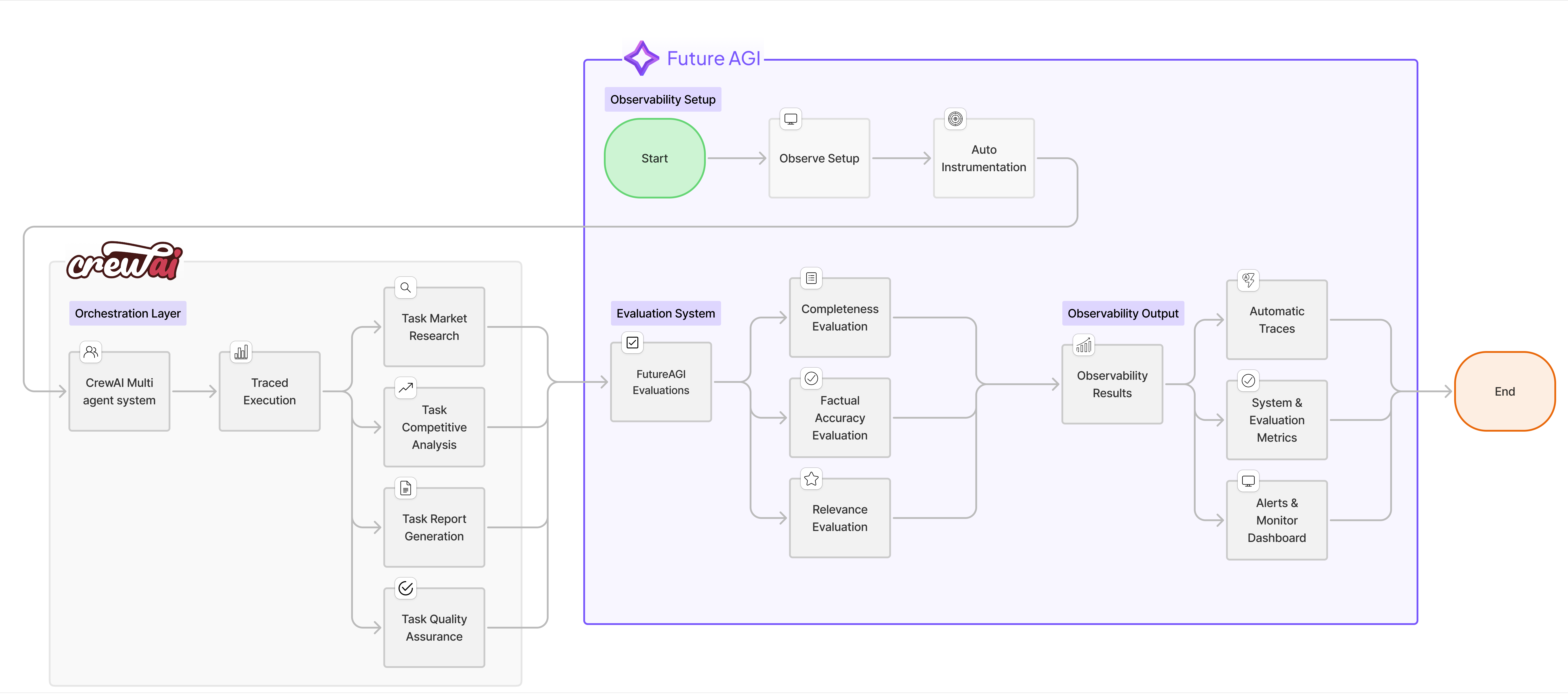
- Multi-Agent Collaboration: Four specialized agents work together in a sequential workflow, each contributing their expertise to build comprehensive research reports
- Real-time Quality Control: As each agent completes their task, FutureAGI’s in-line evaluations immediately assess the output quality across multiple dimensions (completeness, accuracy, relevance, etc.)
- Full Observability: Every action, tool usage, and agent interaction is traced and visible in the FutureAGI dashboard, providing complete transparency into the research process
- Continuous Improvement: By monitoring evaluation scores and performance metrics, you can identify weak points and iteratively improve agent prompts and workflows
Why CrewAI + FutureAGI?
The combination of CrewAI and FutureAGI provides:Prerequisites
Before starting, ensure you have:- Python 3.10 or later
- OpenAI API key
- FutureAGI account (Sign up here)
- SerperDev API key for web search capabilities
Installation
Install the required packages for this cookbook. We’ll be using FutureAGI’s traceAI suite of packages that provide comprehensive observability and evaluation capabilities:FutureAGI Packages
traceai-crewai: Auto-instrumentation package specifically for CrewAI that automatically captures all agent activities, tool usage, and task executions without requiring manual instrumentationfi-instrumentation-otel: Core observability framework that handles trace collection, span management, and telemetry data transmission to FutureAGI platformai-evaluation: Evaluation framework that provides pre-built evaluation templates (completeness, factual accuracy, groundedness, etc.) and enables in-line quality assessment of AI outputs
Other Required Packages
crewai: Multi-agent orchestration framework for building AI teamscrewai_tools: Tool library for CrewAI agents (web search, file operations, etc.)openai: OpenAI Python client for LLM interactions
Note: The traceAI packages are designed to work seamlessly together. The auto-instrumentation (traceai-crewai) builds on top of the core instrumentation framework (fi-instrumentation-otel), while evaluations (ai-evaluation) integrate directly with the tracing system for in-line quality monitoring.
Step-by-Step Implementation
1. Environment Setup
In this initial setup phase, we’re configuring all the necessary components to enable both CrewAI’s multi-agent capabilities and FutureAGI’s observability features. The environment variables authenticate our connections to various services - OpenAI for the LLM that powers our agents, FutureAGI for observability and evaluations, and SerperDev for web search capabilities that our research agents will use. This setup ensures secure communication between all services while keeping sensitive credentials out of the code.2. Initialize Observability and Tracing
Set up FutureAGI’s trace provider and auto-instrumentor to automatically capture all agent activities. The Evaluator enables real-time quality assessment of outputs.3. Define the Research Team Agents
Create four specialized agents: Market Researcher (data gathering), Competitive Analyst (landscape analysis), Report Writer (synthesis), and Quality Analyst (verification). Each agent has specific tools, goals, and backstories that shape their approach.4. Implement In-line Evaluations
Implement evaluation functions that assess agent outputs in real-time using FutureAGI’s pre-built templates. Thetrace_eval=True parameter automatically links results to the observability dashboard.
Why These Specific Evaluations?
We’ve carefully selected evaluation metrics that address the most common challenges in AI-generated research:- Completeness - Ensures the research covers all requested aspects and doesn’t miss critical information
- Factual Accuracy - Validates that the information provided is correct and reliable, crucial for research credibility
- Context Relevance - Confirms that outputs stay on-topic and directly address the research question
trace_eval=True parameter automatically links evaluation results to the current span, making them visible in the observability dashboard.
You can discover additional evaluation templates and metrics in the FutureAGI platform by navigating to the Evaluations section in your dashboard.
5. Define Research Tasks with Integrated Evaluations
Extend CrewAI’s Task class to createEvaluatedTask that automatically runs quality assessments after completion. Each task type gets appropriate evaluation criteria - research tasks check completeness and accuracy, while report tasks assess clarity and structure.
6. Execute the Research Crew
Orchestrate the research team with CrewAI’s sequential process. The auto-instrumentor captures all operations automatically, while custom evaluations assess quality at each step. Results are viewable in real-time on the FutureAGI dashboard.7. Advanced Monitoring and Analysis
Extend monitoring with a customResearchMetricsCollector that tracks task durations, aggregates evaluation scores, and provides performance insights. Essential for production deployments and continuous optimization.
Monitoring in FutureAGI Dashboard
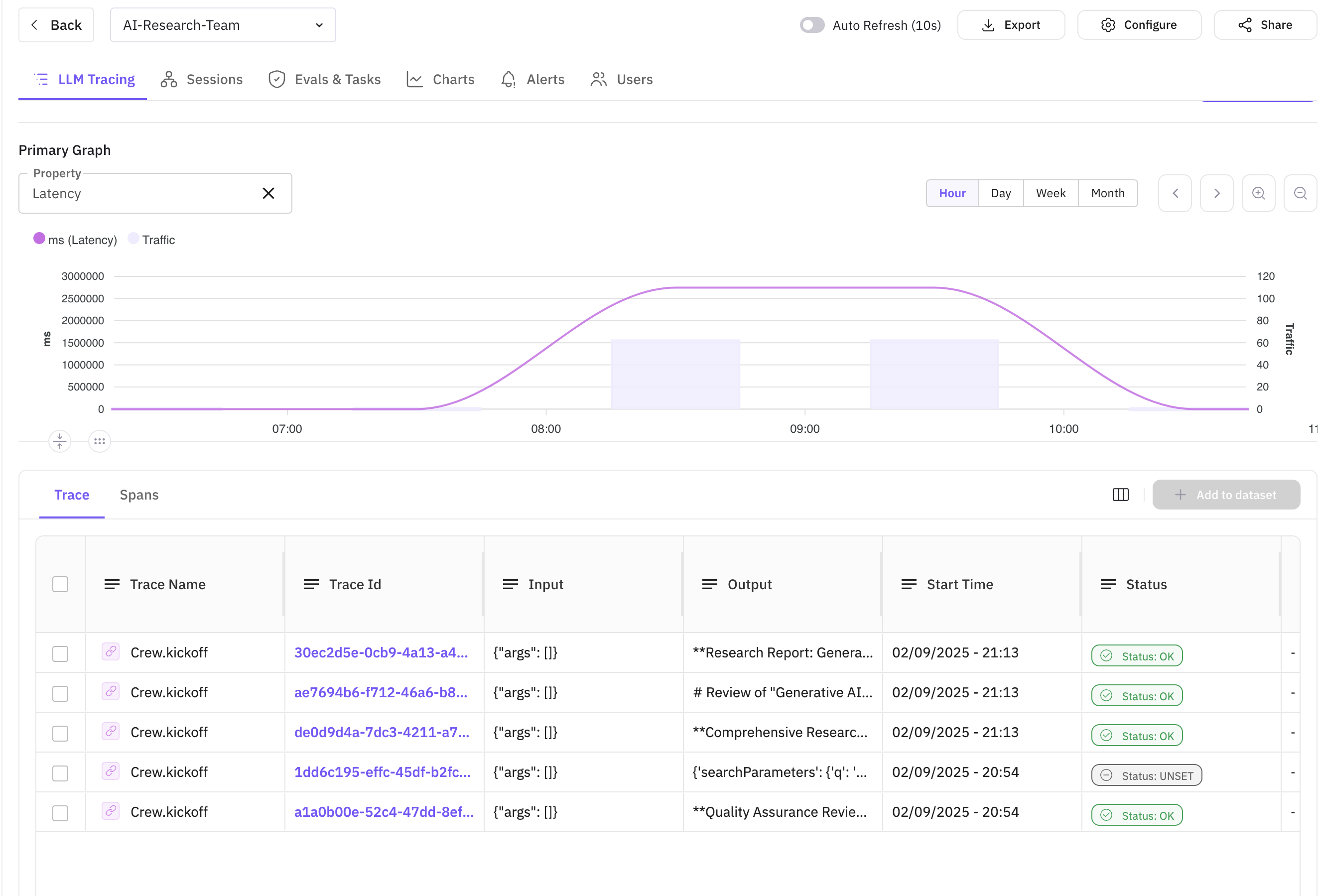
After running your research crew, you can monitor the execution in the FutureAGI dashboard. This is where the true value of observability becomes apparent - you get complete visibility into your multi-agent system’s behavior, performance, and quality metrics.What Observability Brings to the Table
FutureAGI’s observability platform transforms CrewAI from a black box into a transparent, debuggable system. Here’s what you gain:- Complete Execution Visibility: See exactly how agents interact, what tools they use, and how data flows through your system
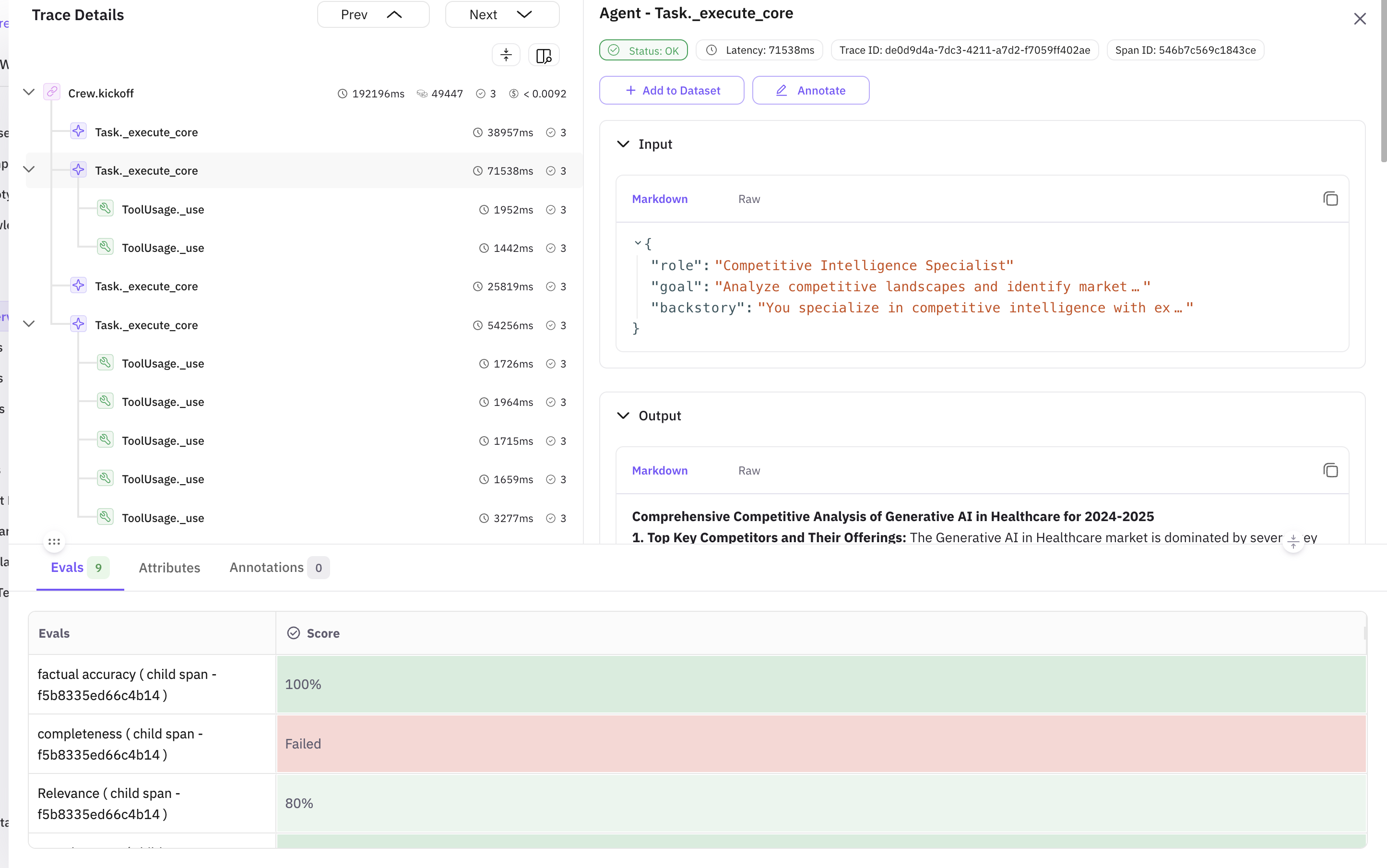
- Real-time Quality Monitoring: In-line evaluations show you immediately if outputs meet quality standards
- Performance Insights: Identify bottlenecks, slow agents, or inefficient workflows
- Error Tracking: Quickly pinpoint and debug failures in complex multi-agent interactions
- Historical Analysis: Track quality trends over time to ensure consistent performance
Dashboard Overview
Trace Details View
Sample Evaluation Metrics from Our Research Run:
Common Issues and Fixes
Based on our evaluation results, here are the most common issues and how to address them:Issue 1: Low Instruction Adherence (0.78)
Problem: The Report Writer agent sometimes missed required sections Fix: Enhanced the agent’s prompt with explicit section requirements and added validation checksIssue 2: Completeness Gaps (0.85)
Problem: Research sometimes missed regulatory aspects Fix: Added specific tool for regulatory research and updated task descriptionIssue 3: Token Usage Optimization
Problem: Some agents used excessive tokens for simple tasks Fix: Implemented token limits and more concise promptsIn-line Evaluation Details
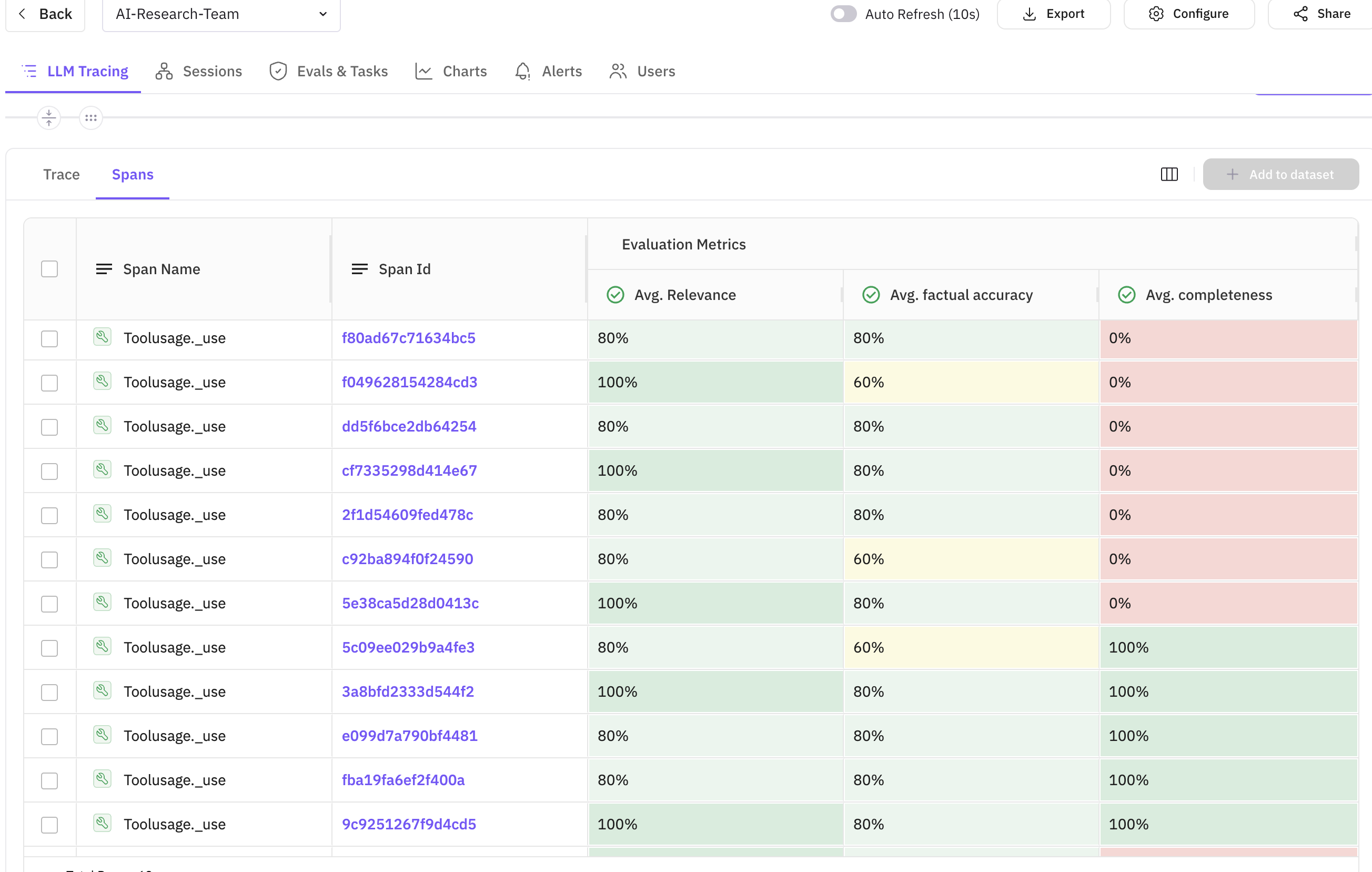
- Evaluation scores displayed directly on the span
- Custom evaluation names for easy identification
- Detailed evaluation results in span attributes
- Correlation between task execution time and quality scores
Key Metrics to Monitor
Best Practices
When building production-ready multi-agent systems with CrewAI and FutureAGI, following these best practices ensures reliability, maintainability, and optimal performance.1. Agent Design
- Specialized Roles: Create agents with specific expertise - just like in a human team, specialization leads to better results
- Clear Goals: Define precise objectives for each agent so they understand exactly what success looks like
- Appropriate Tools: Equip agents with relevant tools - don’t give every agent every tool, match tools to roles
2. Evaluation Strategy
- Multiple Metrics: Use various evaluation templates
- Context-Aware: Provide proper context for evaluations
- Continuous Monitoring: Track metrics across sessions
3. Observability
- Comprehensive Tracing: Trace all critical operations
- Meaningful Attributes: Add relevant metadata to spans
- Error Handling: Properly trace and log errors
4. Performance Optimization
- Parallel Execution: Use
Process.hierarchicalfor parallel tasks when possible - Caching: Implement caching for repeated searches
- Token Management: Monitor and optimize token usage
Troubleshooting Common Issues
Issue 1: Agents Not Collaborating Effectively
Solution: Enable memory in Crew configuration and ensure proper task dependenciesIssue 2: Evaluation Scores Are Low
Solution: Refine agent prompts and provide more specific instructionsIssue 3: Traces Not Appearing in Dashboard
Solution: Verify API keys and network connectivityAdvanced Use Cases
1. Multi-Domain Research
Extend the system to research multiple domains simultaneously:2. Continuous Monitoring
Set up scheduled research runs with alerting:3. Custom Evaluation Models
Integrate your own evaluation models:Conclusion
By combining CrewAI’s multi-agent capabilities with FutureAGI’s observability and evaluation features, you can build sophisticated AI systems with confidence. The real-time monitoring and quality assessment ensure your AI agents perform reliably and produce high-quality outputs.Next Steps
- Experiment with Different Agent Configurations: Try different team compositions for various research domains
- Customize Evaluations: Create domain-specific evaluation criteria
- Scale Your System: Add more agents and parallel processing
- Integrate with Your Workflow: Connect the research system to your existing tools
Resources
📩 Ready to build your AI research team? Sign up for FutureAGI and start monitoring your CrewAI agents today! 💡 Have questions? Join our community forum to connect with other developers building with CrewAI and FutureAGI.