

Core SDK Functions
The Future AGI evaluation pipeline uses two main SDK functions. Let’s understand these step by step:1. Initialize the Evaluator
First, create an evaluator instance with your API credentials:2. Define Your Evaluation Data
Structure your evaluation data with the templates and inputs you want to test, for more details on how to set up evaluations refer to the evals documentation.3. Submit Evaluation Pipeline
Submit your evaluation data for processing:project_name: Your project identifierversion: Version tag for this evaluation runeval_data: List of evaluation configurations
4. Retrieve Results
Get evaluation results for comparison across versions:project_name: Your project identifierversions: List of version tags to retrieve results for
Full GitHub CI/CD Implementation Example
Now let’s implement these SDK functions in a complete GitHub Actions workflow:Prerequisites
Before setting up CI/CD evaluation, ensure you have:- A Future AGI account with API and secret keys
- A GitHub repository with Actions enabled
Required GitHub Secrets
Configure the following secrets in your GitHub repository settings:Required GitHub Variables
Set up these repository variables for configuration:GitHub Actions Workflow File
Create.github/workflows/evaluation.yml:
Evaluation Script File
Createevaluate_pipeline.py:
Requirements File
Createrequirements.txt:
Important: GitHub Permissions
Critical: You must specify the
pull-requests: write permission in your GitHub Actions workflow. Without this permission, you’ll encounter GitHub API errors when the action tries to leave comments on your PR.Workflow Behavior
On Pull Request Creation/Update
- Trigger: Workflow runs automatically on PR to main branch
- Initialize: Uses
Evaluator()to set up API connection - Submit: Uses
evaluate_pipeline()to submit evaluation data - Monitor: Polls using
get_pipeline_results()for completion - Report: Posts formatted comparison results as PR comment
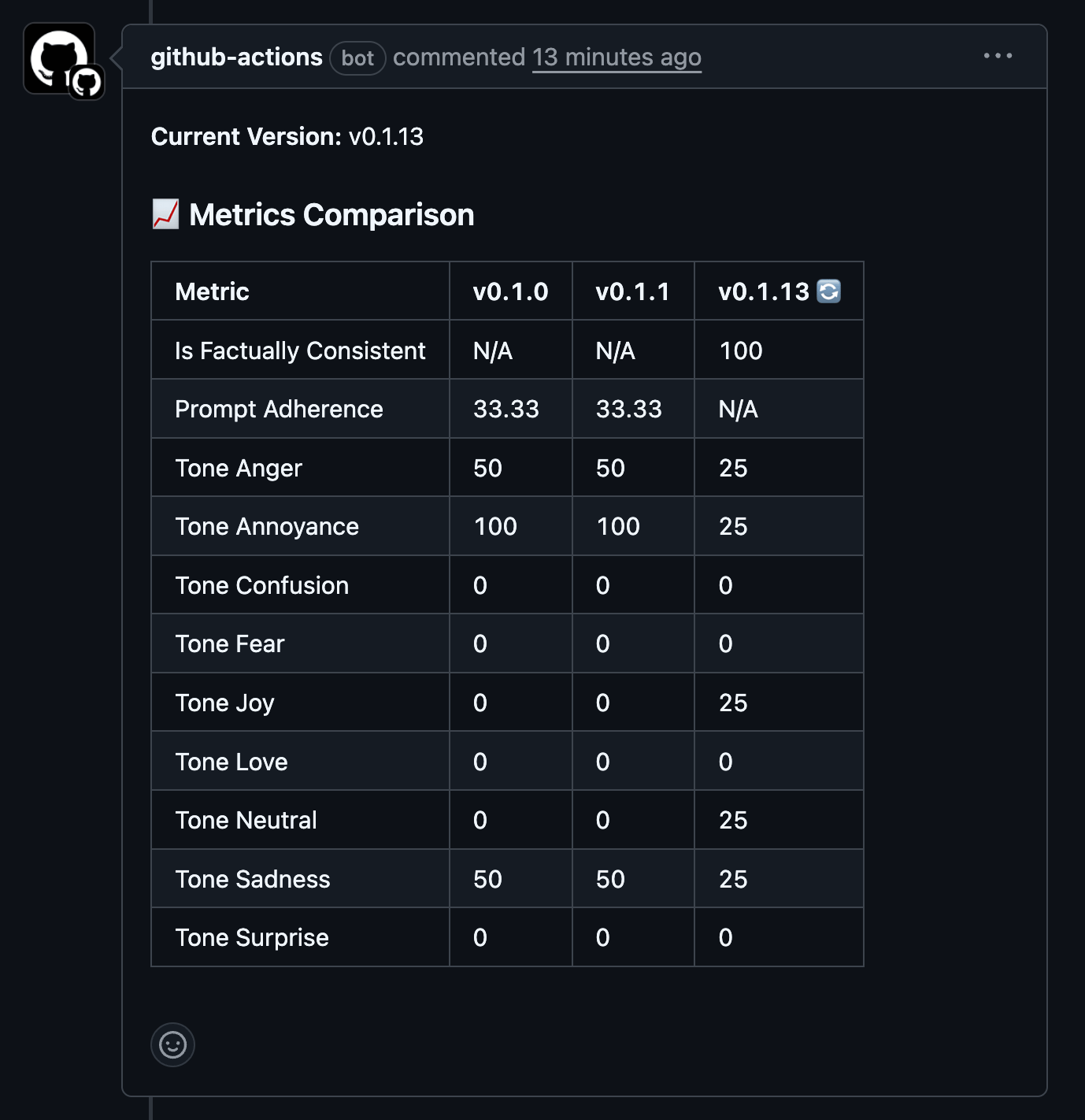
Expected Output
The workflow will post a comment on your PR with:- Current version identifier
- Metrics comparison table across versions
Troubleshooting
Common Issues
GitHub API Errors- Ensure
pull-requests: writepermission is set - Verify
PAT_GITHUBtoken has appropriate repository access
- Check Future AGI API credentials are correctly configured
- Verify project name and version variables are set
- Verify evaluation data format matches your templates
- Increase
max_wait_timefor complex evaluations - Verify network connectivity in GitHub Actions environment