

Key Features
- Timeframe Filtering: Easily filter sessions by specific time periods to access relevant data quickly.
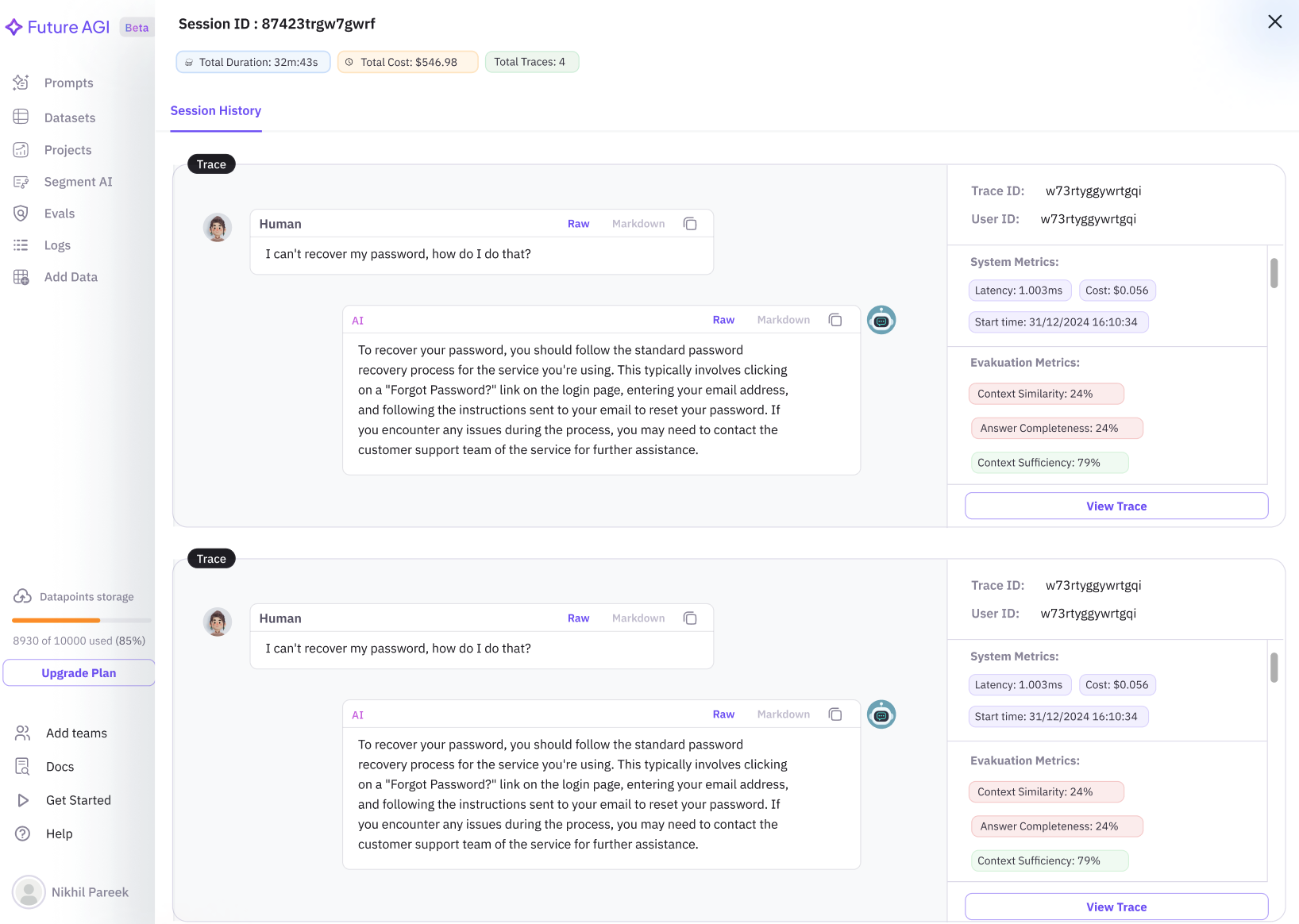
- Session Overview: View a comprehensive list of sessions, providing a snapshot of key information such as session duration and user interactions.
- Detailed Session Insights: Click on a session to access in-depth details, including conversation history and trace specifics.
-
Trace Analysis: Click on
View Traceto dive deeper into individual traces for thorough analysis. - Performance Metrics: Monitor system performance with metrics like latency and cost, and evaluate interaction quality through evaluation metrics.
How to Add Sessions
To associate interactions with a specific session, you can use the following methods:1. Include session.id in a Span
When creating a span, include the session.id attribute to link interactions to a specific session:
2. Use using_session Context Manager
You can use the using_session context manager to set session.id for all spans within the context. This method ensures that the session ID is consistently passed as a span attribute:
session.id using Trace AI helper functions, refer to the manual tracing guide.
Usage
Sessions are particularly useful for:- Debugging chatbot interactions by reviewing grouped traces.
- Analyzing conversation flow and identifying areas for improvement.
- Monitoring system performance and cost efficiency.
View Trace button to access specific trace information.