

What it is
Every annotation queue includes a built-in analytics dashboard that shows progress, throughput, and quality metrics. Use it to monitor how your annotation campaign is going and to identify issues before they compound.Accessing analytics
Open a queue and click the Analytics tab.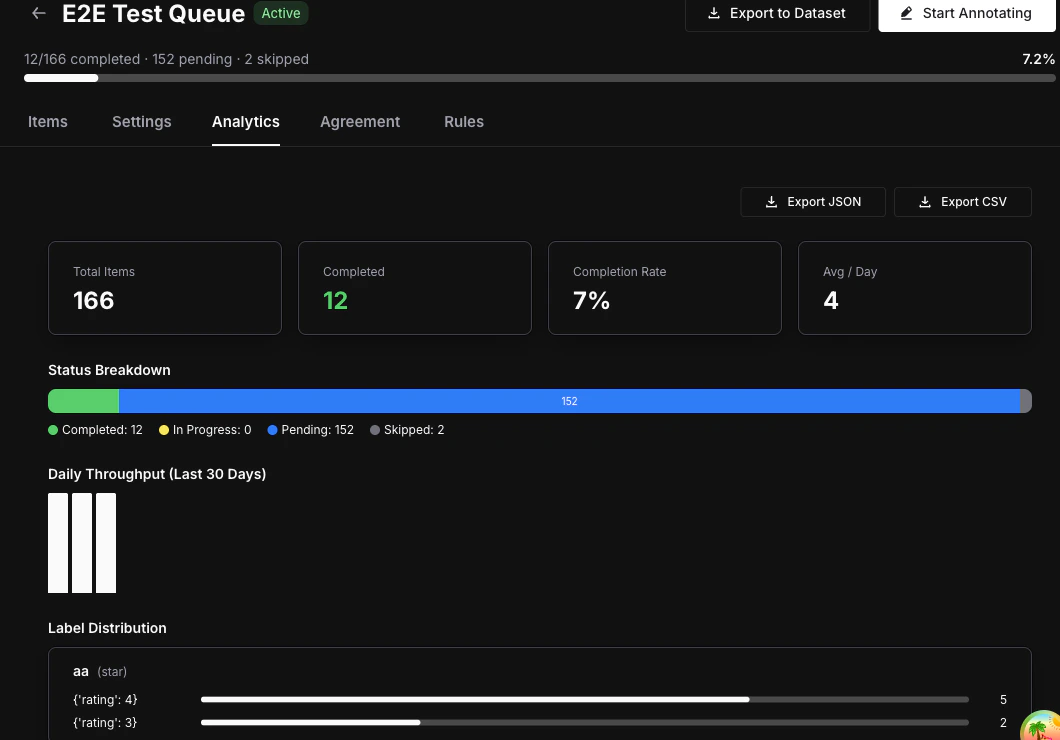
Overview stats
The top of the analytics view shows four key numbers at a glance:- Total items — Number of items currently in the queue.
- Completed — Number of items that have been fully annotated.
- Completion rate — Percentage of items completed out of the total.
- Average completions per day — Rolling daily throughput across the queue’s lifetime.
Status breakdown
A visual bar displays the distribution of item statuses:- Completed (green) — All required annotations collected.
- In Progress (blue) — At least one annotation submitted, more required.
- Pending (gray) — No annotations yet.
- Skipped (orange) — Annotator chose to skip the item.
Daily throughput chart
A bar chart showing the number of completions over the last 30 days. Use it to spot trends, identify slowdowns, and measure annotator velocity over time.Annotator performance table
Label distribution
For each label attached to the queue, the analytics view shows the frequency of each value:- Categorical — Option counts (e.g., “Positive: 45, Negative: 23, Neutral: 12”).
- Numeric / Star — Distribution histogram across the value range.
- Thumbs — Up vs. down counts.
- Text — Total annotation count (text values are not aggregated).
Inter-Annotator Agreement
Switch to the Agreement tab to see consistency metrics between annotators scoring the same items. Metrics used:- Cohen’s Kappa — Used when exactly 2 annotators have scored the same items.
- Fleiss’ Kappa — Used when 3 or more annotators have scored the same items.
Agreement metrics require
annotations_required to be set to 2 or more in your queue settings, and at least 2 annotators must have scored the same items for results to appear.Next steps
Export Annotations
Export completed annotations as datasets for fine-tuning or evaluation.
Annotate Items
Learn the annotation workspace and keyboard shortcuts.
Queues Concept
Understand queue architecture, assignment modes, and lifecycle.